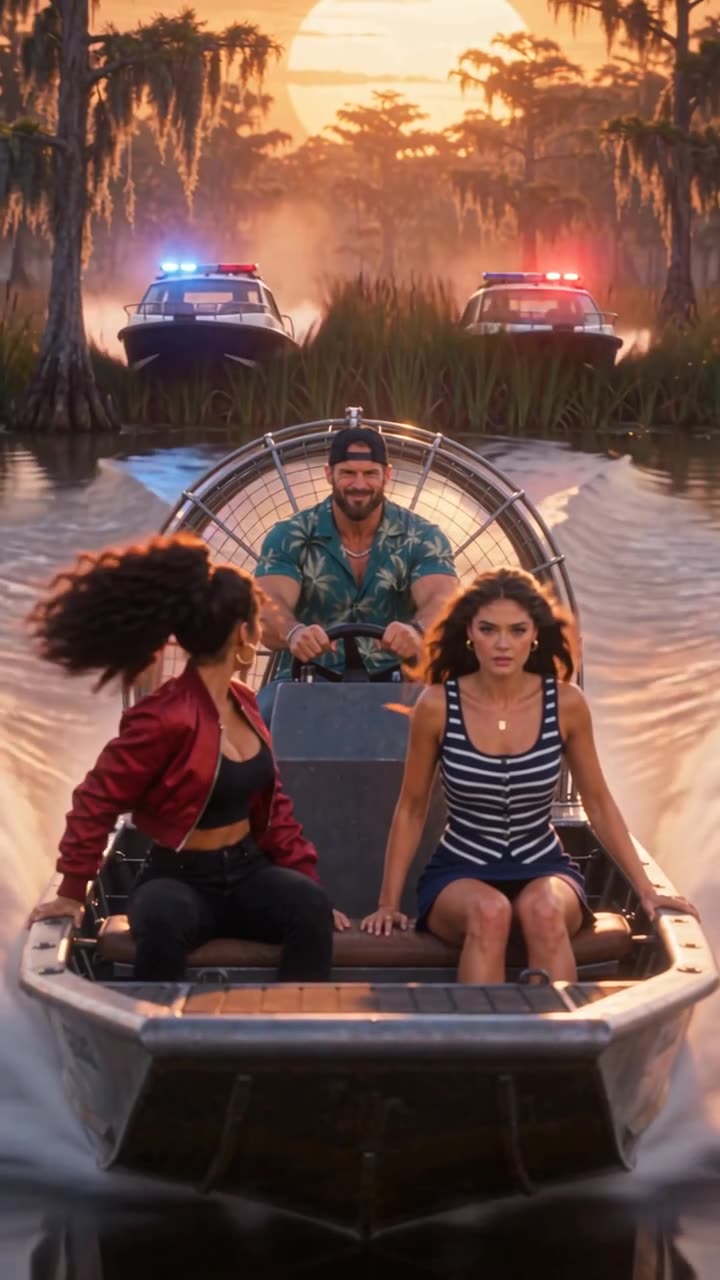
GTA 6 AI couple video: you two in one GTA 6 scene
GTA 6 AI Video (gta6aivideo.net) turns two photos, one of you and one of your partner, into a 15-second GTA 6 AI couple video with sound: you two escape on an airboat, ride a speedboat onto the beach or star in loading-screen art. $8.90 for both of you, no watermark, ready in several minutes.
Scene preview
The scene preview appears here.
1 photo in
Your photo goes here
Your scene out
A GTA 6 AI couple video puts two people into the same GTA 6 style scene: you and your partner, both animated from a photo, racing police boats through a swamp or landing a speedboat on a crowded beach. Three of the five scenes here have a second seat, called the co-star, and it costs the same as a solo video. The generator above opens on the airboat chase with the co-star slot ready: add one photo of each of you and download 15 vertical seconds with the soundtrack.
- Scenes for two: airboat, speedboat, loading screen
- You upload: one photo of each of you
- You get: 15 seconds, 9:16, with sound
- Price: from $8.90 for both of you
The three scenes for two
Each clip below shows the scene your video follows. Yours keeps the shots, camera moves and soundtrack, and recasts two of the people in it from your photos. The loading-screen example runs 30 seconds; your video is the 15-second cut.
All three are vertical 9:16, so they fill a phone screen on TikTok, Reels and Shorts without bars.
Who plays who
The lead is the first photo you upload and the co-star is the second. They don't play equal parts, so it helps to know who does what before you choose:
| Scene | Lead (first photo) | Co-star (second photo) |
|---|---|---|
| Airboat chase | Drives the airboat in every shot and laughs at the wheel as the gator lunges | Rides up front in a red jacket, turns to shout at the police boats and celebrates after the jump |
| Speedboat landing | Stands on the bow, leads the walk up the beach and ends as the illustrated neon portrait | Sits beside the driver in a backwards cap and walks up the beach on the lead's right |
| Loading-screen art | In every beat of the illustration, from the sunset boulevard to the drive under fireworks | Rides in the convertible's passenger seat in the middle of the clip |
Everyone else stays as they are: the second woman on the airboat bench, the speedboat driver, the old crew on the loading-screen boulevard, the police boats and the gator. Each seat keeps its outfit idea, adapted to whoever is in the photo, so any pair of adults works in either seat.
If one of you wants the spotlight, give them the lead. If you want the most time together on screen, pick the airboat: the co-star is in the front shots, the jump and the celebration.
Make your couple video
The generator at the top of this page opens on the airboat chase. To make your GTA 6 AI couple video:
- Pick a scene for two. Keep the airboat, or switch to the speedboat landing or the loading-screen art. The neon night drive and the GTA 5 goodbye are for one person.
- Upload your photo as the lead. This is the person in every shot.
- Add a co-star. Upload your partner's photo in the second slot. It's optional and the price stays the same.
- Tick the consent box. It confirms the video is a parody and that you have permission to use both photos.
- Make it. Each video uses 10 credits. If you have none, a single video costs $8.90 right there, or a pack of 3 costs $19.90 and 5 cost $29.90. It's a one-time payment and credits never expire.
- Download the MP4. It usually takes several minutes, and you can leave the page while it renders. You get 15 seconds in 9:16 with the scene's soundtrack, and the video also waits in My videos.
Make your couple video now, or see how the solo scenes work.
Photos for two
Two separate photos work far better than one photo of the two of you together.
- One face per photo, looking at the camera or close to it. Crop each of you out of a couple shot if that's all you have.
- Sharp and evenly lit, with nothing over the eyes. Sunglasses and low caps make a face harder to match.
- Shoulders up or waist up, so each face is big in the frame.
- Real photos: no heavy filters, cartoons or screenshots. JPG, PNG or WebP, at least 320 pixels on the shortest side.
- Adults who agreed. Ask your partner before you use their photo. No kids and no celebrities.
Photos are used only to make your video, and the AI video platform deletes them within 24 hours.
Posting it as a couple
- Ask first. Your partner is in the video too, so post it only if they're happy with it.
- Turn on the AI label. TikTok has an AI-generated content setting when you post, and Instagram has its own AI label.
- Tag each other and say what it is in the caption: a GTA 6 AI couple video, made as a parody.
- Don't call it real. Don't present it as game footage or as official.
GTA 6 couple video questions
Can I put me and my girlfriend in a GTA 6 AI video?
How much does a GTA 6 AI couple video cost?
Which GTA 6 scenes work for two people?
Do we both get the same screen time?
Does it work for any couple?
Is there a free GTA 6 AI couple video generator?
Can we post our GTA 6 couple video on TikTok?
Characters and places in these videos are AI-generated look-alikes in a fan parody. This site is an independent fan tool, not affiliated with, endorsed by or connected to Rockstar Games, Take-Two Interactive or the Grand Theft Auto series. Facts as of November 20, 2026.