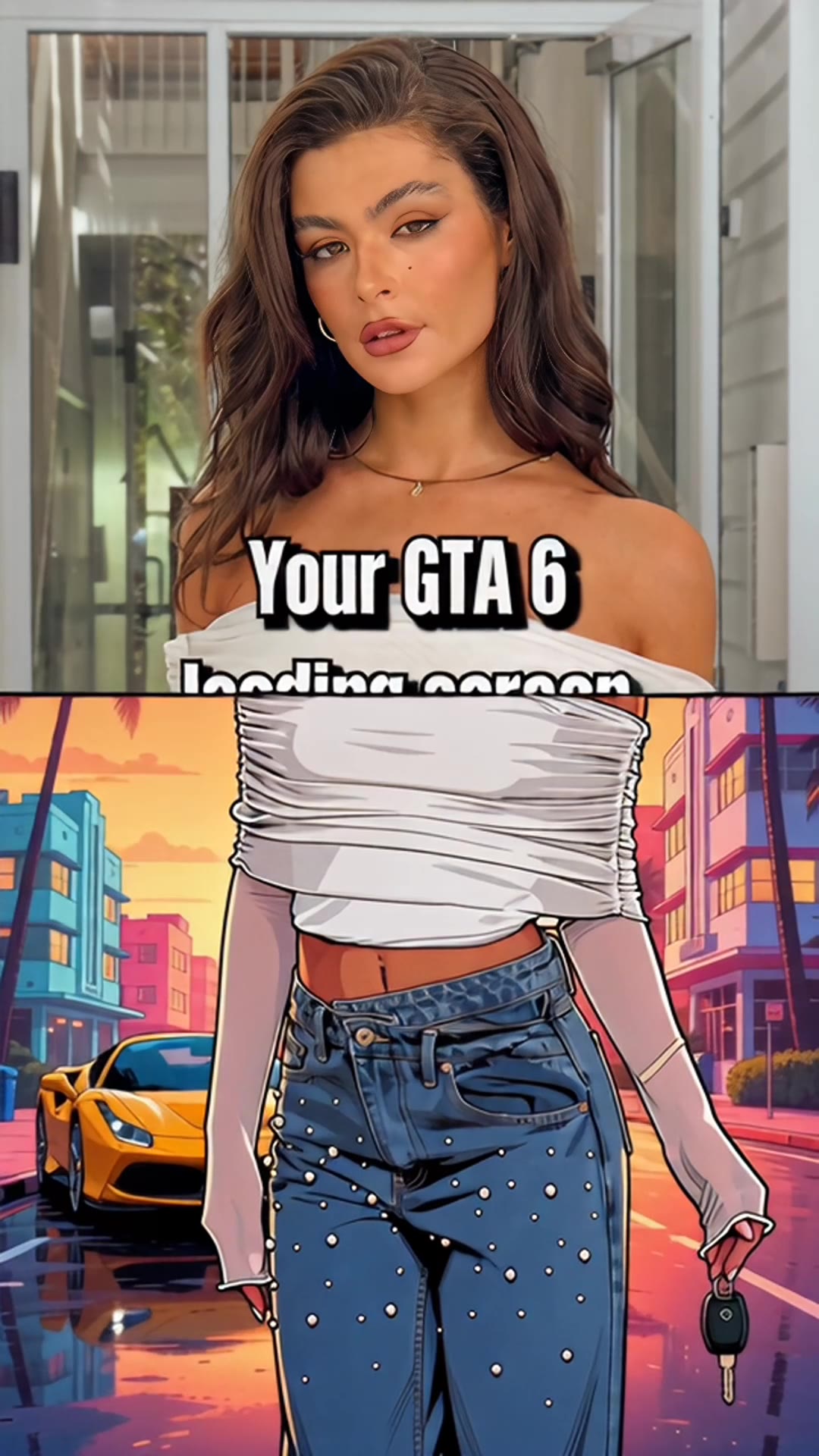
GTA 6 AI filter: turn your photo into a loading screen
GTA 6 AI Video (gta6aivideo.net) turns your photo into a 15-second GTA 6 AI filter video with sound: animated loading-screen art, not just a still, with ink outlines, flat color, sunset palms and a seat for a friend or partner. $8.90, no watermark. Below: what the TikTok filter is, where the CapCut template wave came from and how the two compare.
Scene preview
The scene preview appears here.
1 photo in
Your photo goes here
Your scene out
The GTA 6 AI filter redraws an ordinary photo in the illustrated style of a GTA loading screen: thick black outlines, flat cel-shaded color, an orange rim light and a sunset sky full of palm trees. It took over Instagram stories and TikTok in the days before GTA 6 launched on November 19, 2026. Most people used a photo template. The generator above makes the video version from one photo, with motion and sound, and the loading-screen scene is already selected.
- Look: ink outlines, flat color, sunset palms
- Peak: launch week, November 2026
- Here: a 15-second vertical video with sound
- From $8.90, no subscription
What the filter does
It turns you into a character on a loading screen, the illustrated art you stare at while an open-world game loads. The ingredients are always the same:
- Bold ink outlines and flat, poster-like shading instead of photo detail.
- A warm rim light, usually orange, on hair, cheekbones and shoulders.
- A sunset backdrop: palm trees, pastel art deco hotels, a sports car, a wet street throwing back neon.
- A character-intro pose: walking toward the camera, keys in hand, a look over the sunglasses.
You'll also see it called the GTA 6 loading screen AI, the GTA filter, or simply "my GTA 6 loading screen."
The CapCut template wave
The filter went mainstream through CapCut. The template most people used, "GTA 6 Screen AI," runs about 8 seconds, vertical, with its own music, and closes on the game's logo.
- Template uses. Trend write-ups that tracked the template page reported about 155,800 uses on November 16 and about 224,600 by November 20, 2026.
- TikTok. Most posts under #gtafilter and #gta6filter went up between November 10 and November 16, the week before launch.
- Search. In Google Trends, worldwide interest in "gta 6 loading screen" hit its peak on launch day, November 19, and stayed there on November 20. Searches for "gta filter" came mostly from the UK, the US and Canada, and "gta 6 ai filter" was still climbing fast on November 20.
The template is a photo effect: one picture, restyled, with a zoom or a wipe. That's why so many results look alike, and why people started asking for a version that actually moves.
Photo filter or video version
The two get mixed up, but they're different things.
| Photo filter (CapCut and similar) | Video version (this site) | |
|---|---|---|
| What you get | Your photo restyled, as a still or a short reveal | A 15-second illustrated scene with you as the lead |
| Motion | A zoom or wipe over one picture | Camera moves, other characters, a beginning and an end |
| Sound | Template music | The scene's soundtrack |
| People | One | You, plus an optional second person |
| Frame | Vertical | Vertical 9:16 |
The loading-screen scene here starts on a palm-lined road at sunset with a crowd lined up on both sides, moves through a row of characters greeting the lead, and ends on fireworks over a neon skyline.
The same illustrated look turns up at the end of other scenes too, like the speedboat landing, which finishes on a drawn portrait panel.
Make the loading-screen video
To get the GTA 6 AI filter as a video, use the generator at the top of this page. The loading-screen scene is already selected.
- Upload one photo. A clear face looking at the camera, nothing over the eyes. JPG, PNG or WebP, at least 320 pixels on the shortest side.
- Add a second person if you like. This scene has an optional co-star seat at the same price.
- Tick the consent box and make it. Each video uses 10 credits. You can buy a single video for $8.90 in the same step, or a pack of 3 for $19.90 or 5 for $29.90.
- Download it. It usually takes several minutes. You get 15 seconds, vertical 9:16, with sound.
Want a still instead, for a profile picture or a story? The GTA 6 AI prompts page has copy-paste loading-screen prompts for image models.
Getting the look right: the outlines exaggerate whatever is in the photo, so a sharp, evenly lit face matters more than usual. Skip beauty filters, which flatten the features the drawing needs. And a photo where your outfit is visible gives the redraw more to work with.
Posting to Instagram, TikTok or Snapchat
- Stories, Reels and TikTok all take the vertical MP4 as it is.
- Snapchat: there's no lens to install; upload the MP4 as a story or Spotlight post.
- Label it. Turn on TikTok's AI-generated content setting or Instagram's AI label.
- Tags people use: #gtafilter and #gta6filter.
For the bigger picture, from the loading-screen craze to the GTA 5 farewells, read the GTA 6 AI video trend, explained.
GTA 6 filter questions
What is the GTA 6 AI filter?
How do I get the GTA 6 loading screen filter?
Is the GTA filter on CapCut?
Is there a GTA filter on Instagram or Snapchat?
Is the GTA 6 AI filter free?
Can I make a GTA 6 loading screen with my partner?
Is the GTA 6 AI filter official?
The loading-screen look is a fan style made with AI. This site is an independent fan tool, not affiliated with, endorsed by or connected to Rockstar Games, Take-Two Interactive or the Grand Theft Auto series. Template counts and search trends as of November 20, 2026.